What is an MCP Gateway? Key Features and Benefits
TL;DR
- An MCP gateway is a single control plane between AI models and MCP servers that handles tool discovery, routing, authentication, governance, and execution from one endpoint.
- Without a gateway, every agent configures its own MCP servers, credentials, and approval rules, which creates configuration sprawl, token bloat, and no central audit record.
- Bifrost works as an MCP gateway with six MCP auth types, per-virtual-key tool filtering, explicit execution by default, Agent Mode, and Code Mode.
- Code Mode cuts input tokens by up to 92.8% at roughly 500 tools, and Bifrost adds 11 microseconds of overhead per request at 5,000 RPS.
An MCP gateway is a single control plane between language models and every external system they call through the Model Context Protocol, and it becomes necessary once AI agents move from prototypes to production. Bifrost, the open-source AI gateway by Maxim AI, works as a production-grade MCP gateway that gives engineering teams centralized tool discovery, governance, security, and execution across all of their connected MCP servers, with 11 microseconds of overhead at 5,000 requests per second.
This post covers the key features and benefits of an MCP gateway, why it matters for production agent workflows, and how Bifrost approaches MCP at scale. For the underlying architecture in more depth, see the production guide to what an MCP gateway is.
What is an MCP Gateway?
An MCP gateway is a centralized infrastructure layer that connects AI models to external tools through the Model Context Protocol, handling tool discovery, routing, authentication, governance, and execution from a single endpoint. It sits between LLM clients (chat apps, coding agents, autonomous workflows) and the growing ecosystem of MCP servers that expose filesystems, databases, APIs, and custom business logic to AI models.
The Model Context Protocol itself is an open standard introduced by Anthropic in late 2024 that standardizes how AI applications connect to external data sources and tools. As the official MCP specification describes, MCP standardizes integration between LLM applications and external systems through a client-server architecture. Adoption has been rapid: in Anthropic's own words, MCP has become the de-facto standard for connecting agents to tools and data, with thousands of community-built servers and SDKs across all major programming languages.
A gateway extends MCP from a one-to-one protocol into multi-tenant production infrastructure. The distinctions between the three roles are laid out in MCP gateway vs MCP proxy vs MCP server.
Why MCP Gateways Matter for AI Teams
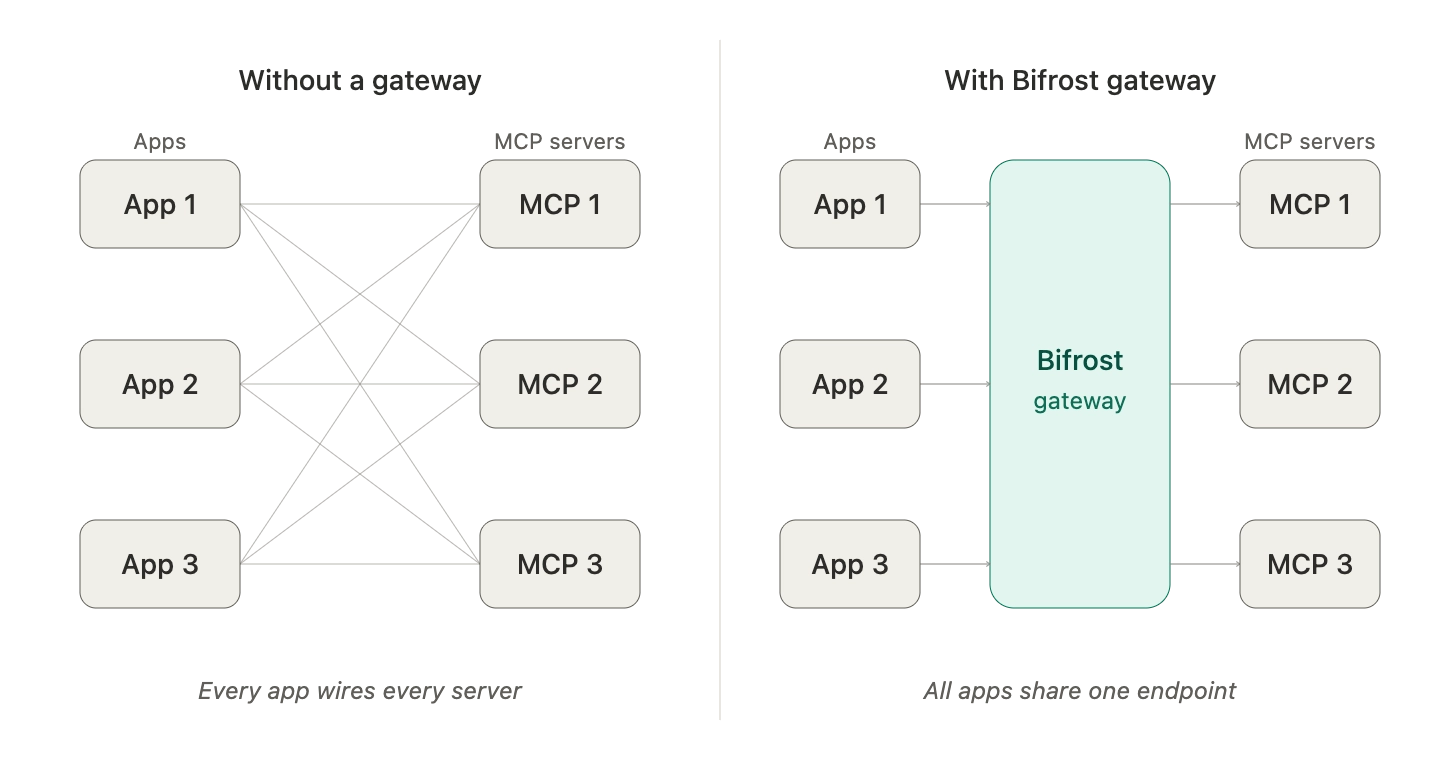
MCP gateways matter because, without one, every MCP integration is direct and uncoordinated. Each agent or assistant configures its own MCP servers, credentials, and approval rules independently, which leads to predictable problems at scale:
- Configuration sprawl: every coding agent, app, or workflow maintains its own list of MCP servers, credentials, and approval rules.
- No unified governance: there is no single place to enforce who can use which tool, what budgets apply, or what audit data is captured.
- Token bloat: when many MCP servers are connected directly, full tool definitions are loaded into every prompt, consuming significant context and increasing latency. Anthropic's engineering team has noted that loading all tool definitions upfront slows down agents and increases costs as the number of connected tools grows.
- Fragmented security: OAuth flows, secret rotation, and tool filtering must be implemented per integration rather than centrally.
- Limited observability: tool calls happen across disconnected processes with no consolidated trace of what executed, when, or why.
An MCP gateway consolidates all of this. Tools are registered once and exposed through a single gateway URL. Governance, auth, filtering, observability, and execution policies live at the gateway layer, not in every agent. This is the difference between an experimental MCP setup and a production agent platform, and it is why MCP tool governance with filtering and allowlisting belongs at the gateway rather than in each agent.
How Bifrost Works as an MCP Gateway
Bifrost acts as both an MCP client and an MCP server. It connects to external MCP-compatible tool servers (filesystem, databases, search, internal APIs) over STDIO, HTTP, or SSE and exposes a single endpoint that any MCP client can connect to, including Claude Desktop, Claude Code, Codex CLI, Gemini CLI, and Cursor.
The model interaction stays clean: an application sends a standard chat completion request, Bifrost injects the discovered MCP tools into the request, and the LLM returns tool call suggestions. By default, those suggestions are not auto-executed. The application explicitly approves and triggers execution through a separate API call. This stateless, explicit pattern preserves human oversight on potentially dangerous operations while keeping the orchestration logic predictable.
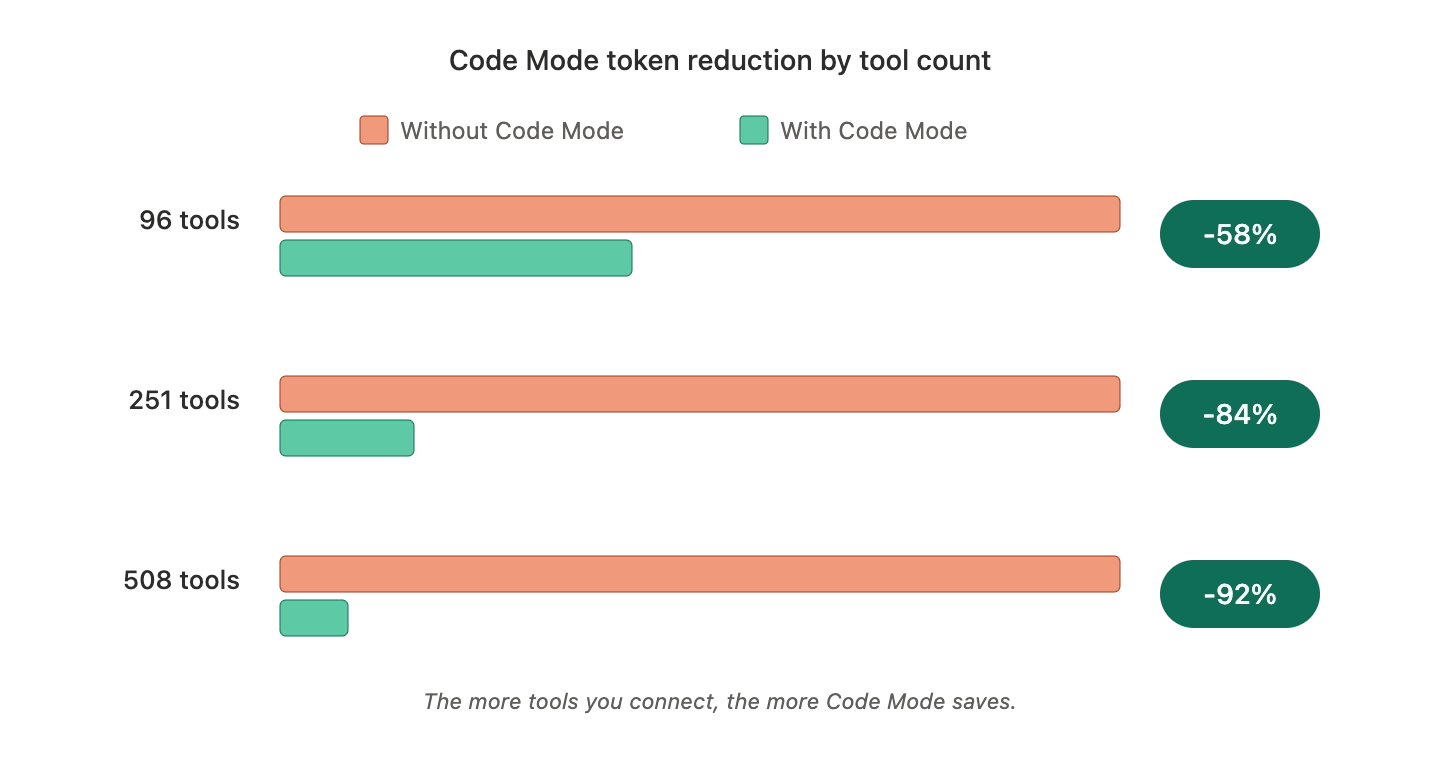
For teams that want autonomous behavior, Bifrost offers an agent mode that allows configurable auto-execution for specific tools. For teams running large tool ecosystems, Bifrost offers Code Mode, which exposes four generic tools and lets the model write Python (Starlark) that orchestrates many tools inside a sandbox rather than receiving full tool definitions in the prompt. Code Mode reduces input tokens by up to 92.8% and delivers around 40% faster execution in large MCP deployments compared to classic MCP tool calling, as detailed in what Code Mode is and how it works.
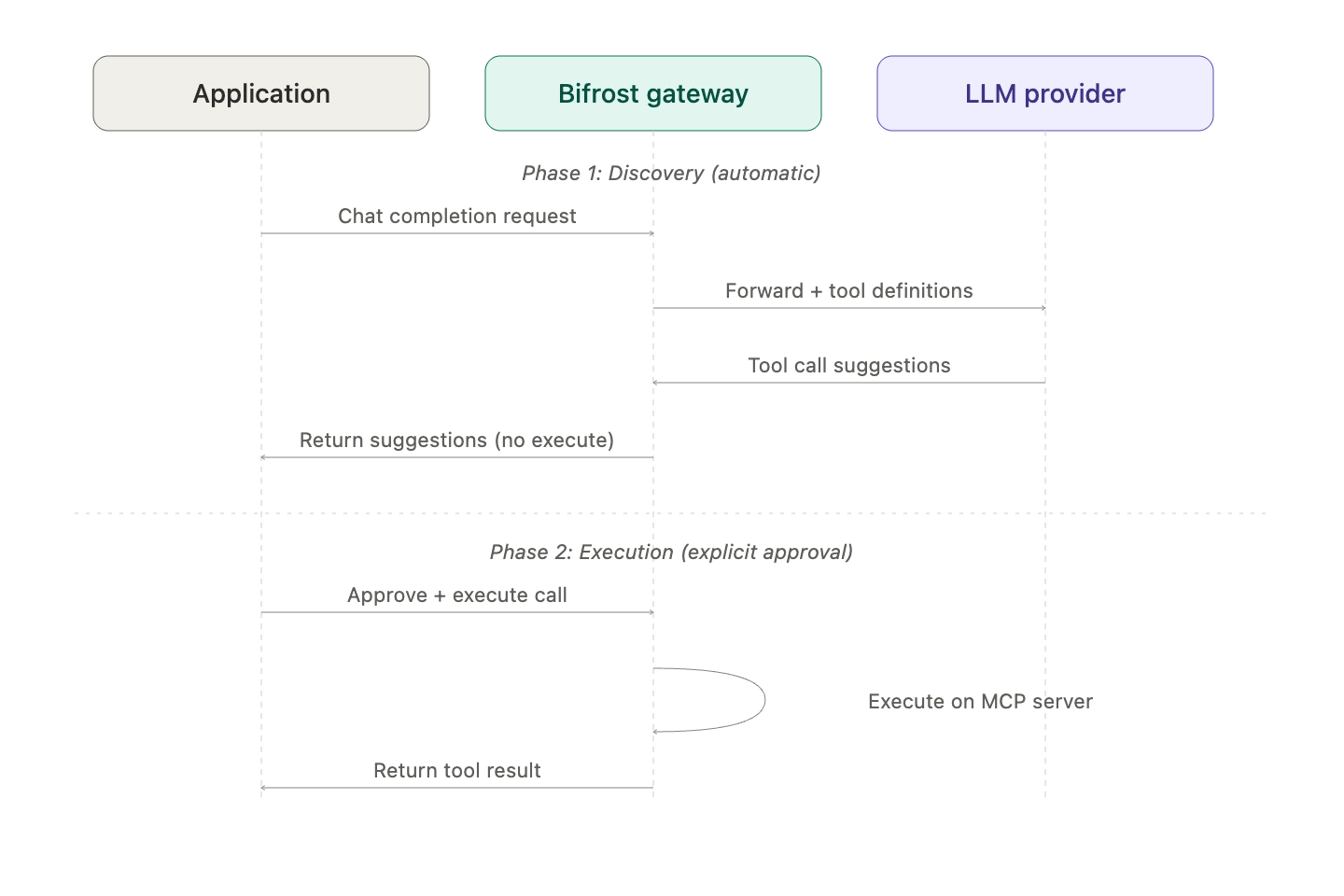
The three execution models trade control for autonomy and token efficiency:
| Execution model | How tool calls run | Best suited for |
|---|---|---|
| Explicit execution (default) | Model suggests tool calls; the application approves and executes each one | Sensitive or write operations that need human oversight |
| Agent Mode | Bifrost auto-executes tools listed as auto-executable, returns the rest for approval | Trusted, low-risk tools in multi-step agent loops |
| Code Mode | Model writes Starlark code against four meta-tools; Bifrost runs it in a sandbox | Large tool catalogs where token cost and latency dominate |
Key Features of a Production-Grade MCP Gateway
A production MCP gateway has to do more than relay tool calls. The features below define what separates a real gateway from a thin protocol shim, and each is part of Bifrost as an MCP gateway.
- Single gateway endpoint: every connected MCP server is exposed through one URL. Clients connect once and discover the entire tool ecosystem automatically.
- Multi-transport connectivity: support for STDIO, HTTP, and SSE-based MCP connections with automatic retry and exponential backoff for transient failures.
- Centralized OAuth and auth: six MCP authentication types, including OAuth 2.0 with automatic token refresh and PKCE, per-user OAuth and headers for end-user credentials, and enterprise token exchange.
- Tool filtering: granular control over which MCP tools are visible to which client, virtual key, or request.
- Tool hosting (Go SDK): when Bifrost is embedded as a Go SDK, custom tools can be registered in-process and exposed via MCP without standing up separate servers.
- Explicit execution by default: tool calls from LLMs are treated as suggestions until the application explicitly approves them, preserving auditability.
- Agent mode: configurable auto-execution for trusted, low-risk tools.
- Code Mode: model-written Python (Starlark) orchestration for token-efficient multi-tool workflows.
- Request logging: MCP tool calls are logged with their arguments, results, and metadata for compliance and debugging.
- Governance integration: tool access is governed by the same virtual keys that control model access, budgets, and rate limits.
Key Benefits of Using an MCP Gateway
Centralizing MCP behind a gateway delivers measurable improvements in cost, reliability, and security. The largest single gain is token cost, because a gateway can replace full tool catalogs in every prompt with on-demand discovery, while the governance gains come from applying one policy layer to both models and tools.
- Lower token costs at scale: Bifrost's Code Mode benchmarks show 58.2% input-token reduction at 96 tools, 84.5% at 251 tools, and 92.8% at 508 tools versus passing every tool definition to the model directly. For details on the architecture and benchmarks, see the Bifrost MCP gateway deep dive.
- Predictable agent behavior: when orchestration moves from prompt-time tool selection to deterministic code execution, agent workflows become easier to reason about and reproduce.
- Unified governance: virtual keys integrate model access and tool access into a single policy layer, preventing cases where an agent has permission to call a model but no enforced limits on what tools it can run.
- Centralized security posture: OAuth, secret management through HashiCorp Vault, AWS Secrets Manager, or GCP Secret Manager, and content guardrails that also cover MCP tool executions live at the gateway, not in every agent.
- Observability across all tool calls: every MCP execution is captured with metadata, providing a complete audit trail and operational telemetry without per-agent instrumentation work.
- Lower integration cost: instead of wiring MCP servers into every coding agent and assistant, teams point all clients at the gateway URL and update the registry centrally.
- Performance headroom: 11 microseconds of overhead at 5,000 RPS means the gateway adds negligible latency, even under sustained production load.
Key Considerations for MCP Gateway Implementation
Choosing and deploying an MCP gateway involves trade-offs across execution model, tool scope, authentication, observability, deployment topology, and token efficiency, and engineering teams should evaluate each before committing. The options available in open source are compared in the best open-source MCP gateways.
- Execution model: decide whether your workflows need explicit approval, autonomous agent mode, or Code Mode. Most production systems use a mix, with sensitive operations gated behind explicit execution and routine read-only tools auto-executed.
- Scope of tool access: tool filtering should map to a clear authorization model. Treat tool access the same way you treat database access: least privilege, scoped per consumer.
- Auth strategy: for tools that act on user data, federated OAuth where each end-user authenticates under their own credentials avoids the operational and security burden of shared service accounts. The patterns are covered in MCP authentication with OAuth, API keys, and token management.
- Observability requirements: confirm the gateway integrates with your existing telemetry. Bifrost emits Prometheus metrics, supports OTLP for distributed tracing, and integrates with Grafana, New Relic, Honeycomb, and Datadog.
- Deployment topology: regulated industries often need in-VPC deployments and clustering for high availability. Confirm the gateway supports both.
- Token efficiency at scale: if you expect to connect dozens or hundreds of MCP servers, plan for Code Mode or an equivalent code-execution pattern. Loading every tool definition into every prompt becomes costly as the tool catalog grows.
How MCP Gateways Fit into Broader AI Infrastructure
An MCP gateway works best as one layer of a complete agent infrastructure stack rather than as a standalone product. In Bifrost's case, MCP runs alongside automatic failover across 25+ providers and 10,000+ models, semantic caching, budgets and rate limits, and built-in observability. The same virtual key that limits how many tokens an agent can spend on a model also controls which MCP tools the agent can invoke.
For coding agents specifically, the same gateway endpoint serves Claude Code and Codex CLI without per-agent reconfiguration.
Gemini CLI and Cursor connect to the same endpoint in the same way.
Frequently Asked Questions About MCP Gateways
Do we need an MCP gateway?
A team needs an MCP gateway once more than a few agents or assistants share MCP servers, or once tool access has to be governed. Without one, each client stores its own credentials and tool lists, and there is no central place to filter tools, cap spend, or log calls. A single agent calling one or two servers can run without a gateway.
What is the difference between an MCP server and an MCP gateway?
An MCP server exposes a specific set of tools, such as a filesystem, a database, or a SaaS API. An MCP gateway connects to many MCP servers and presents their combined tools to clients through one governed endpoint, adding authentication, tool filtering, logging, and execution policy. Bifrost acts as both: an MCP client to upstream servers and an MCP server to clients.
Is an MCP gateway similar to an API gateway?
An MCP gateway plays a similar role to an API gateway, centralizing routing, authentication, and rate limits, but it operates on MCP traffic rather than REST calls. It also handles MCP-specific work that an API gateway does not, such as aggregating tool catalogs, filtering which tools a model can see, and reducing tool-definition context with Code Mode.
How does an MCP gateway work?
An MCP gateway connects to upstream MCP servers, discovers their tools, and exposes them through one endpoint. When an application sends a chat request, the gateway injects the tools the caller is allowed to use, the model returns tool call suggestions, and the gateway executes them explicitly, automatically through Agent Mode auto-execution, or as sandboxed code through Code Mode orchestration, logging each call.
Is there an open-source MCP gateway?
Yes. Bifrost is an open-source AI gateway that works as both an MCP client and an MCP server, with tool filtering per virtual key, Agent Mode, Code Mode, and request logging for MCP calls. It can be installed with a single npx command and self-hosted, including in-VPC deployments for regulated environments.
Getting Started with Bifrost as an MCP Gateway
Bifrost gives engineering teams a single, governed control plane for AI agent tool access, with the performance characteristics required for production workloads. Teams can install Bifrost in 30 seconds with npx -y @maximhq/bifrost using the gateway setup guide, connect their MCP servers, and start routing tool calls through a single endpoint with request logging, governance, and Code Mode efficiency. For a broader view of the category, the complete MCP gateway guide for production AI agents covers architecture and deployment trade-offs.
To see how Bifrost as an MCP gateway can simplify your AI agent infrastructure, book a demo with the Bifrost team.