MCP Client vs Server: Connectors, Hosts, and Servers
MCP client vs server is the core split in the Model Context Protocol: the client lives inside an AI application and the server exposes tools and data. This guide traces a request from connector to client to server and shows what changes when a gateway sits between them.
TL;DR
- An MCP server is a program that exposes tools, resources, and prompts; an MCP client is the component inside an AI application that connects to one server and calls it.
- The AI application itself is the MCP host, and it creates one MCP client for each MCP server it connects to.
- An MCP connector is the packaged, user-facing registration of a server inside a host, such as a custom connector in Claude that points to a remote MCP server.
- A tool call always flows model to host to client to server and back; the model never talks to a server directly.
- An MCP gateway such as Bifrost acts as a server to every client and as a client to every upstream server, which gives one place to apply access and credential policy.
MCP client vs server is the first distinction to get right when connecting AI applications to tools: the MCP server exposes capabilities, and the MCP client, running inside the host application, connects to that server and invokes them on the model's behalf. Connectors are the layer users see on top. Bifrost, the open-source MCP gateway and AI gateway built by Maxim AI, plays both roles at once, so it is a useful reference point for how the pieces connect. This guide defines each component and follows one tool call from connector to server and back.
MCP Client vs Server: The Short Answer
An MCP client is a protocol component inside an AI application that holds a connection to exactly one MCP server, discovers what it offers, and sends it requests. An MCP server is a separate program that exposes tools, resources, and prompts over the Model Context Protocol and executes requests it receives. Clients consume; servers provide.
The MCP architecture specification names three participants, and the confusion usually comes from treating two of them as one:
| Component | What it is | Example | Responsibility |
|---|---|---|---|
| MCP host | The AI application the user runs | An IDE, a chat app, a coding agent | Runs the model loop, manages clients, asks the user for consent |
| MCP client | A connection object inside the host | One client per configured server | Discovers capabilities, sends requests, returns results to the host |
| MCP server | A separate program, local or remote | A GitHub, database, or filesystem server | Exposes tools, resources, prompts and executes calls |
| MCP connector | A packaged server registration in a host | A custom connector in a chat app | Stores the server URL, auth settings, and enablement for users |
Figure 1 shows the relationship: one host, several clients, each client paired with one server.
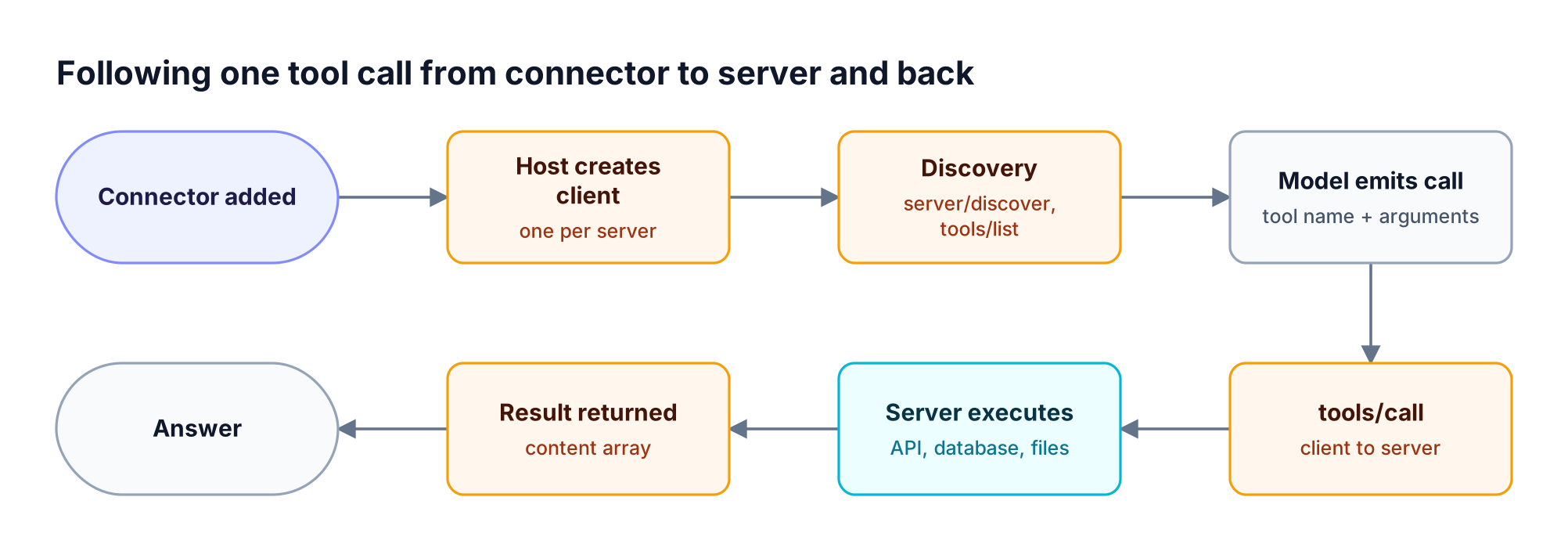
Figure 1: The client lives inside the host; the server is a separate program the client talks to.
The broader Model Context Protocol guide covers the protocol's history and the 2026 specification changes in more depth.
What Is an MCP Connector?
An MCP connector is the user-facing packaging of an MCP server inside a host application: a named entry that stores the server's address, authentication method, and on or off state, so users can enable a server without editing configuration files. Under the connector is always an ordinary MCP server, and inside the host, a client connects to it.
The term comes from AI applications rather than from the protocol specification. In Claude, for example, a custom connector is a remote MCP server that an owner adds by URL, and the connection originates from Anthropic's cloud rather than the user's machine. That detail matters for network design: a server behind a corporate firewall is unreachable to a connector brokered from a vendor's cloud.
Connectors therefore answer an operational question, not a protocol one: who added this server, for whom, and with which credentials. Our full explainer on what MCP connectors are and how to govern them covers vendor connector directories and approval flows.
What Is an MCP Host?
An MCP host is the AI application that coordinates the model, the user, and every MCP client. It decides which servers to connect, creates a client for each, merges their tools into the list the model sees, executes the calls the model requests, and asks the user for approval when a call is sensitive. Claude Desktop, Cursor, and custom agents are hosts.
The host owns the trust decisions. It decides whether a tool call runs automatically or waits for confirmation, which servers' tools are combined, and how results are fed back to the model. When a team adds ten servers to one host, the host is also where tool definitions pile up in the model's context, which is the root of the token cost of connecting many MCP servers.
What Is an MCP Client?
An MCP client is the protocol component a host creates to talk to one MCP server. It discovers the server's capabilities, lists its tools, resources, and prompts, sends tool calls with arguments, and passes results back to the host. Each client keeps a dedicated relationship with its server, so a host connected to five servers runs five clients.
Under the 2026-07-28 MCP specification, the protocol core is stateless: every request carries its protocol version and the client's capabilities in its metadata, and clients can call server/discover to learn a server's supported versions and capabilities. Clients can also offer features back to servers, chiefly elicitation, which lets a server ask the user for input before a tool runs. Bifrost forwards these questions to the connected client through multi round-trip requests.
Common sources of confusion in the MCP client vs server split:
- The client is not the model. The model only emits a structured request; the client turns it into a protocol call.
- The client is not the host. One host contains many clients.
- A client is not tied to a vendor. Any MCP-compatible client can connect to any MCP server that speaks a supported protocol version.
What Is an MCP Server?
On the other side of the MCP client vs server relationship, an MCP server is a program that exposes capabilities to MCP clients through three primitives: tools the model can invoke, resources the application can read, and prompts users can select. It receives JSON-RPC requests, runs the requested operation against the system it wraps, and returns structured results. A server can run locally as a subprocess or remotely as a web service.
A database server might expose run_query as a tool, the schema as a resource, and an analysis template as a prompt. Servers come from vendors, open-source projects, or internal teams; directories such as the Bifrost MCP server catalog list setup details for common ones like the GitHub MCP server.
The server side is also where most security risk sits, since a server holds credentials to the system behind it and executes whatever the client sends within its permissions. The differences between an MCP gateway, proxy, and server explain which layer should enforce which control.
Following One Tool Call From Connector to Server
A tool call moves through five hops: the connector registers the server in the host, the host creates a client, the client discovers the server's tools, the model emits a call that the client sends as tools/call, and the server executes it and returns a result the host feeds back to the model. Figure 2 traces the full path.
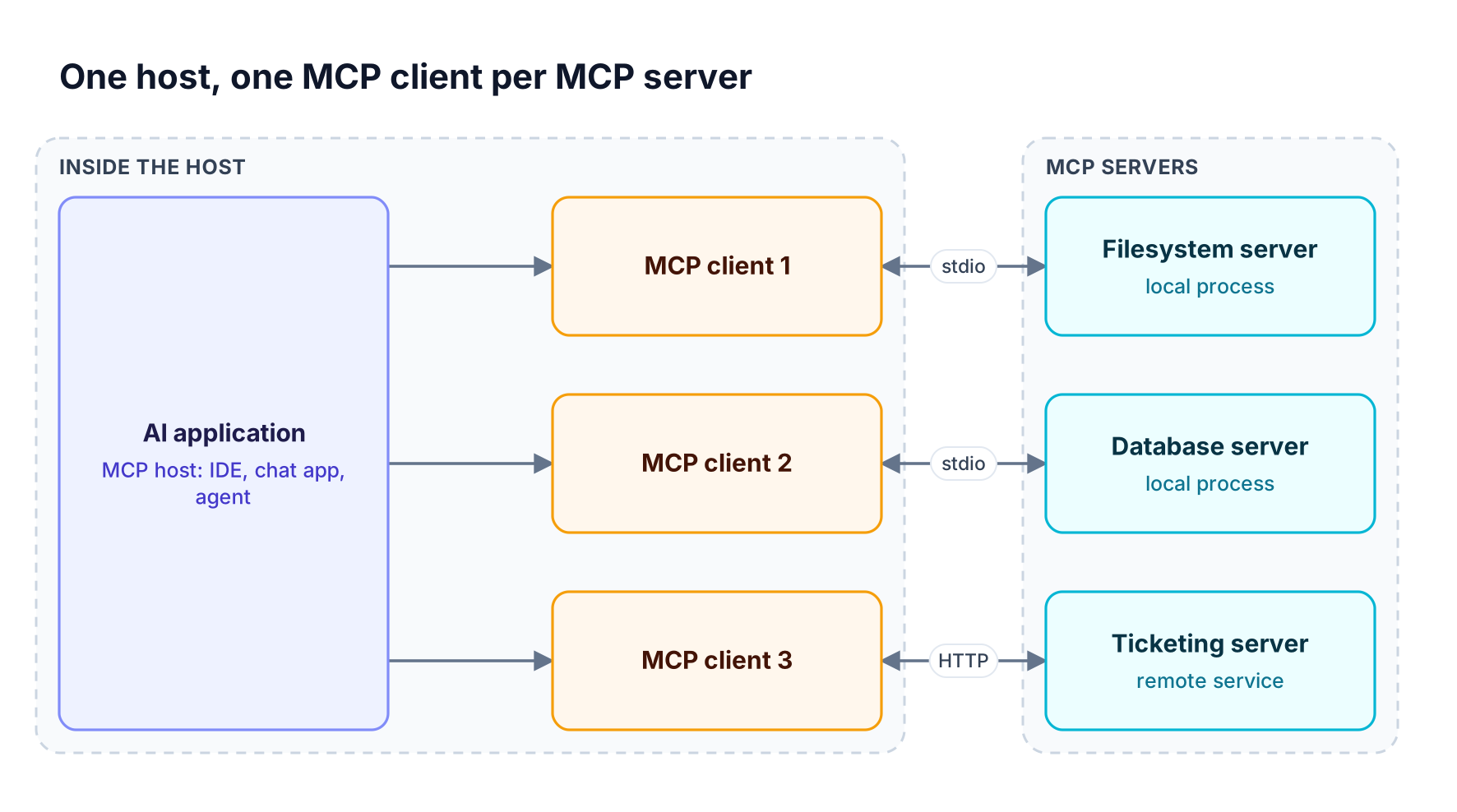
Figure 2: The model never talks to the server directly; every call and result passes through the MCP client.
Step by step:
- Registration. A user or admin adds a connector or a server entry with its URL or launch command and auth settings.
- Client creation. The host instantiates a client for that server and opens the transport.
- Discovery. The client calls
server/discoverandtools/list; the host merges the tool definitions into the model's tool list. - Invocation. The model returns a tool name and arguments; the host decides whether to run it, then the client sends
tools/call. - Result. The server returns a content array; the host adds it to the conversation and the model continues.
Every governance question maps to one of these hops. Who may register a server is a connector question (see how to govern MCP connectors at scale), which tools the model sees is a discovery question, and whether a call runs is an invocation question. In Bifrost, invocation is explicit by default: the model's tool calls are suggestions until the application executes them.
Local vs Remote MCP Servers
Transport choice shapes the MCP client vs server connection. Local MCP servers run as a subprocess on the same machine as the client and communicate over stdio; remote MCP servers run as network services and communicate over Streamable HTTP. Local servers usually serve one client, while remote servers serve many clients and therefore need real authentication, typically OAuth.
| Property | Local server (stdio) | Remote server (Streamable HTTP) |
|---|---|---|
| Where it runs | On the user's machine, launched by the host | On a server or SaaS platform |
| Clients served | Usually one | Many |
| Authentication | Inherits the user's environment | Bearer tokens or OAuth |
| Typical use | Filesystem, local repos, CLIs | SaaS tools, shared internal services |
| Main risk | Arbitrary code runs with user privileges | Token misuse and over-broad access |
The older HTTP with Server-Sent Events transport is deprecated in the current specification in favor of Streamable HTTP. Teams consolidating SaaS servers often put them behind remote MCP server gateways so credentials stay off developer machines.
What Changes When a Gateway Sits Between Client and Server
An MCP gateway changes the topology from many direct client-to-server pairs into a hub: every client connects to the gateway as if it were one MCP server, and the gateway connects to every upstream server as their MCP client. Access policy, credentials, and logs then live in one place instead of in each host's configuration.
The Bifrost gateway implements both roles. As an MCP client, it connects to upstream servers over STDIO, HTTP, or SSE, or generates a server from an OpenAPI document. As an MCP server, it exposes every connected tool at a single /mcp endpoint that Claude Desktop, Cursor, or a custom agent can use. Figure 3 shows the arrangement.
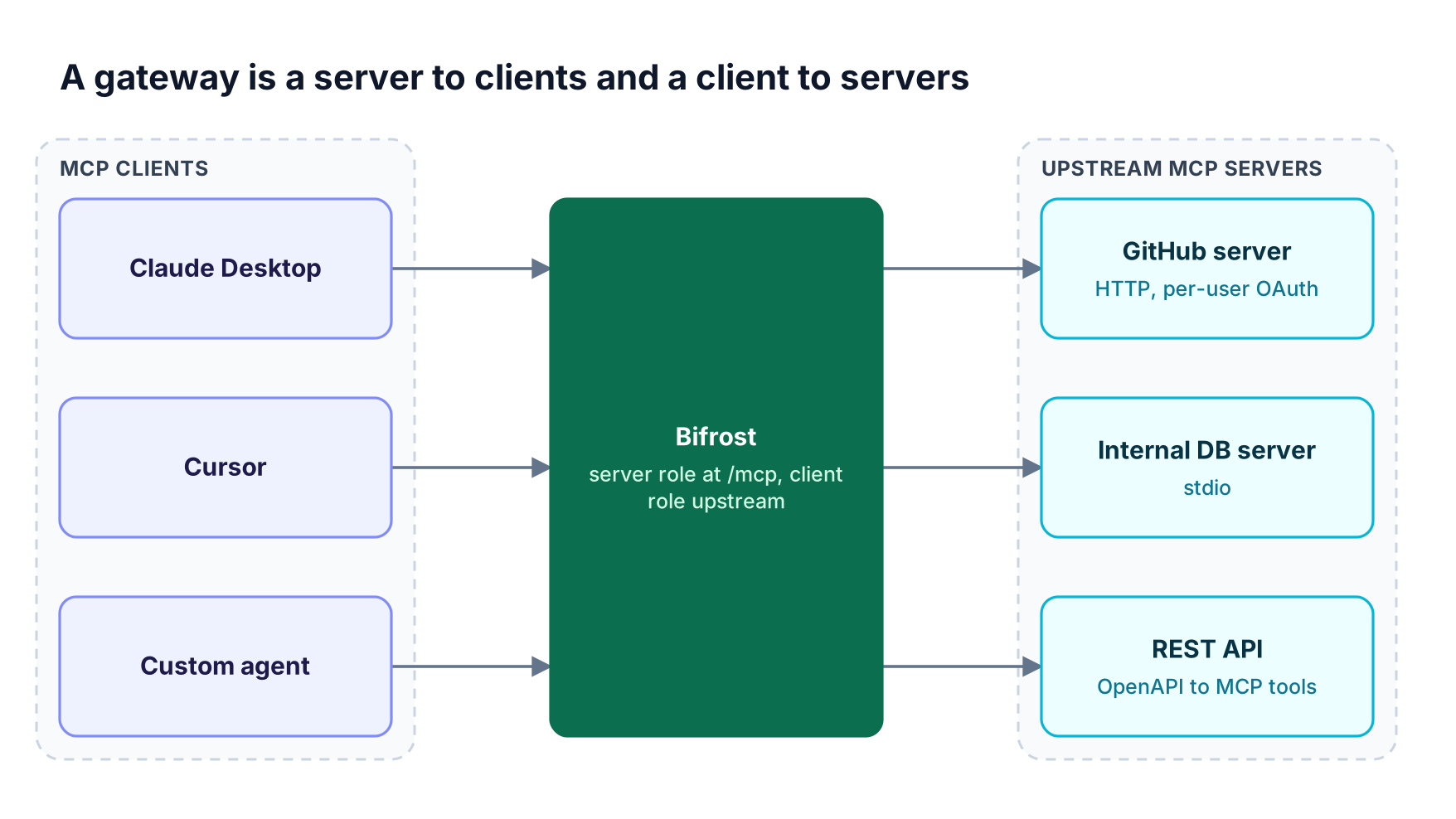
Figure 3: Putting Bifrost in the middle turns many client-to-server connections into one governed endpoint.
What the gateway position adds on each side:
- Toward clients (server role): clients authenticate with virtual key headers or a browser-based OAuth 2.1 connect flow, and
tools/listreturns only the tools that credential allows - Toward upstream servers (client role): Bifrost holds credentials using authentication types that range from shared headers to per-user OAuth (plus token exchange in Bifrost Enterprise), so each user reaches GitHub or Notion as themselves
- Curated endpoints: Virtual MCPs bundle selected tools from several servers behind one
/mcp/<slug>URL for a specific team or agent - Connection health: Bifrost health-checks each upstream server and retries transient failures with exponential backoff, as described in connections and lifecycles
Because virtual keys are deny-by-default for MCP tools, a new server added to the gateway stays invisible to callers until someone grants it, unless an admin marks it Allow by Default. The MCP gateway product page and the Claude Code multi-server walkthrough show the setup in practice.
For large tool sets, Code Mode cuts input tokens by up to 92.8% by letting the model load tool definitions on demand; the MCP gateway resource page summarizes the benchmark.
Frequently Asked Questions
What is the difference between an MCP client and an MCP server?
An MCP client is a component inside an AI application that connects to one MCP server and sends it requests. An MCP server is a separate program that exposes tools, resources, and prompts and executes those requests. The client consumes capabilities; the server provides them. A host application runs one client for each server it connects to.
What is an MCP host?
An MCP host is the AI application that runs the model and manages MCP clients, such as Claude Desktop, Cursor, or a custom agent. The host creates a client for each configured server, merges their tools into the model's tool list, executes the calls the model requests, and handles user approval for sensitive actions.
Is an MCP connector the same as an MCP server?
Not exactly. An MCP connector is how a host application packages an MCP server for users: a named entry with the server's URL, authentication, and enablement settings. The connector points to an MCP server, and the host connects to that server through an MCP client. Connectors are a product concept; servers are a protocol concept.
Can one MCP server serve multiple clients?
Yes. Remote MCP servers that use Streamable HTTP typically serve many clients at once, each with its own credentials. Local servers launched over stdio usually serve a single client, because the host starts them as a subprocess. An MCP gateway such as Bifrost can expose one upstream server to many clients while applying per-client access rules.
Can something be both an MCP client and an MCP server?
Yes. An MCP gateway is both: it acts as an MCP server to the applications that connect to it and as an MCP client to the upstream servers behind it. Bifrost works this way, aggregating upstream tools behind one /mcp endpoint, and the MCP proxy architecture explainer compares this pattern with simpler proxies.
Do MCP clients need authentication to connect to a server?
Remote servers should require it. The MCP specification recommends OAuth for remote servers, and servers must not accept tokens that were not issued for them. Local stdio servers inherit the user's environment instead. Through a gateway, clients authenticate once to the gateway, and the gateway manages credentials for each upstream server.
Getting Started with Bifrost
Understanding the MCP client vs server split makes it clear where control belongs: hosts decide what runs, clients carry calls, and servers hold credentials to real systems. A gateway in the middle gives one place to manage all three. To see how Bifrost governs MCP clients and servers across your teams, book a demo with the Bifrost team.